After getting advice on Polycount.com I redid the sculpt.
Baking is done, I got it down to 1044 tris.
Texturing time! I am using 512's this time.
Friday, May 31, 2013
Saturday, April 20, 2013
Monday, April 15, 2013
Stylized Sculpted Chest
I went to GDC a couple weeks back. Great time was had-even with the blisters, but that is what I get for wearing shoes I don't normally wear. Some of the advice I received was to get different styles in my portfolio. In response to that, I am working on a sculpted stylized handpainted chest.
I have started on the low poly, planning on around 750-1000 tris.
Since starting on the chest, it was recommended that I make a mini environment to go around it. I am thinking a barred stone recess, a little ways up from the floor.
I have started on the low poly, planning on around 750-1000 tris.
Since starting on the chest, it was recommended that I make a mini environment to go around it. I am thinking a barred stone recess, a little ways up from the floor.
Tuesday, February 5, 2013
Friday, February 1, 2013
Completed: Deus Ex: HR Corridor
I completed this environment based on Concept Art for Deus Ex : Human Revolution. I attempted to only use 1 texture, but ended up going over. Finally stats were 1 1024 d/s/n/e, 1 256 d/s/n and 1 512 d (decals). I also learned alot about nDo2 and dDo. All models, textures and renders were completed by me.
Let me know what you think.
Sunday, January 27, 2013
WIP Deus Ex:Human Revolution-the Hallway!
Working on concept art for Dues Ex:Human Revolution in UDK
I am Learning nDo2 and dDo during this project. I was trying do keep the environment to one Map, but needed a second for the pipes and wires, and a third for decals. Well, at least I am still under 2048...
Friday, December 7, 2012
Mini Tutorial: Remove UDK HUD with 3 easy nodes Bonus: Remove Weapons and Warning Messages
Writing this for a friend, and to help myself remember... age.
On the top bar, Go to View > World Properties It will open a new window, scroll down to World Information and simply check the No Default Inventory For Players.
If you have Comments or Questions, feel free contact me. If I made a mistake or you have a better way, let me know and I will change it. Thank you for looking.
Hide the HUD
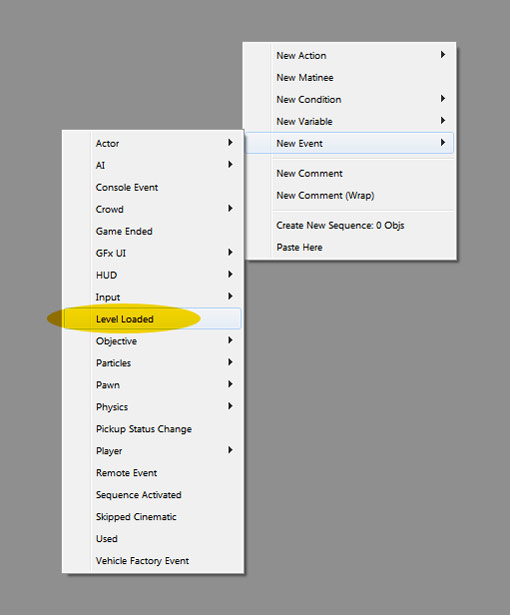
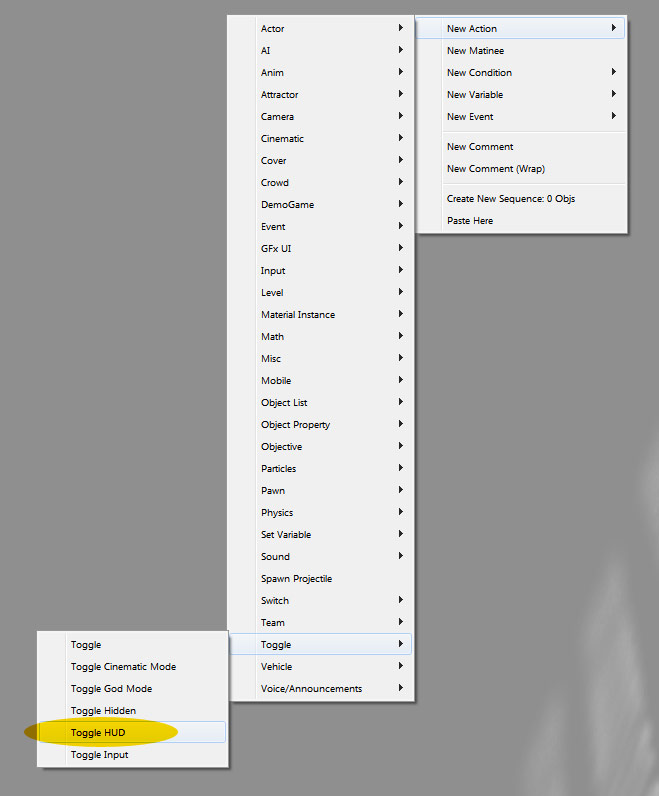
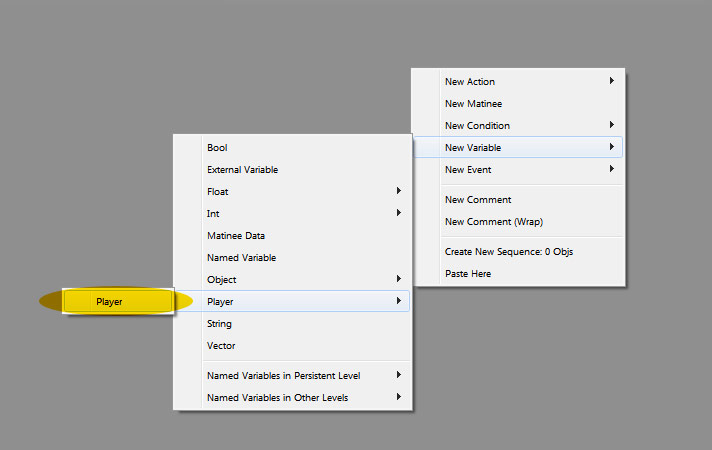
This tut is assuming you know how to open kismet... so you know, open it now. You are going to need 3 nodes: Level Loaded, Toggle HUD, and Player.![]() |
| To find Level Loaded, Right Click in the space and go to New Event > Level Loaded |
![]() |
| To find Toggle HUD, Right Click in the space and go to New Action > Toggle > Toggle HUD |
![]() |
| To find Player, Right Click in the space and go to New Variable > Player > Player |
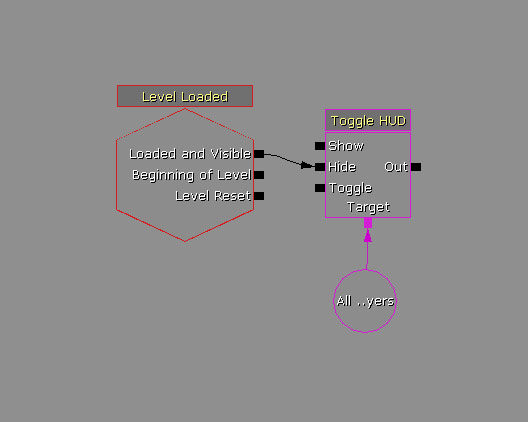
![]() |
| Now, Connect the wires between Loaded and visible to Hide, and Target onto Player, and you are finished. |
Bonus Material!
Permanently Hide UDK's weapons!
On the top bar, Go to View > World Properties It will open a new window, scroll down to World Information and simply check the No Default Inventory For Players.
Remove Warning Messages from Play Screen!
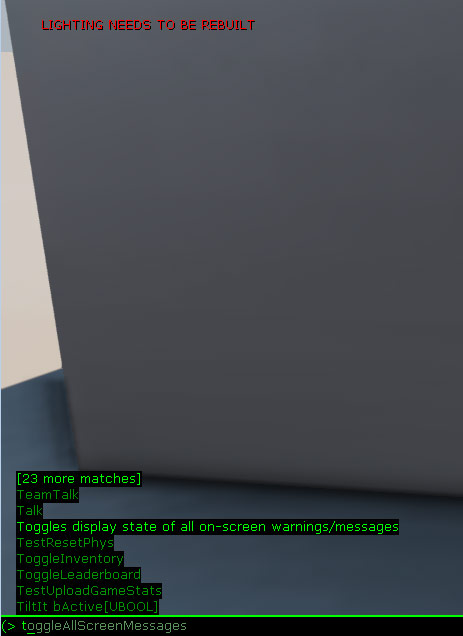
Remove those annoying messages from the top left of the screen.![]() |
Hit Tab or ` to open the typing console. Type t and it will be the first choice- toggleAllScreenMessages
|
If you have Comments or Questions, feel free contact me. If I made a mistake or you have a better way, let me know and I will change it. Thank you for looking.
Labels:
Hide,
hide weapon,
HUD,
Remove,
remove HUD,
remove warning,
tut,
tutorial,
UDK
Subscribe to:
Posts (Atom)